- Home
- Integrations
- FooEvents
FooEvents + Hotel Maps Pro
Hotel booking for the FooEvents plugin.
FooEvents sells your event tickets through WooCommerce. Hotel Maps Pro shows ticket buyers where to stay: a Where to Stay tab on each event’s product page, and hotels again once they’ve bought.
Free. Works with FooEvents for WooCommerce and its Multi-day and Bookings add-ons. Needs Hotel Maps Pro 2.5 or later and WordPress 6.8 or later.
What FooEvents Does
Event tickets, sold through WooCommerce.
FooEvents turns WooCommerce products into event tickets, so you sell tickets, take payment and check attendees in from your own WordPress site, with no commission or ticket fees.
- Tickets as WooCommerce productsSell tickets with WooCommerce’s own checkout and payment options.
- Attendee detailsCollect each attendee’s name and details when they buy.
- Tickets by emailEach ticket is emailed with a barcode for checking in.
- Check-in appsCheck attendees in at the door from a phone or tablet.
- Multi-day eventsWith the Multi-day add-on, events that run over several days in a row or on chosen days.
- Bookable sessionsWith the Bookings add-on, customers book a slot on the date they choose.
FooEvents for WooCommerce is a paid plugin. Its add-ons, including Multi-day and Bookings, are sold separately.
The Missing Piece
Then ticket buyers ask: where should we stay?
Your event page sells the ticket. For anyone travelling, the next job is finding a bed nearby, and that usually means leaving your site to search somewhere else.
- Organizers keep lists of hotel links up to date by hand
- Attendees search for the wrong dates or the wrong part of town
- Rooms near the venue go first
The Next Level
Hotels before they buy, and again once they have.
| For Your Ticket Buyers | FooEvents | With Hotel Maps Pro |
|---|---|---|
| Event details, dates and venue | ||
| Tickets by email after purchase | ||
| Hotels and rentals near the venue | Not included | |
| Live prices for the event’s dates | Not included | |
| Hotels for the date booked, on the order confirmation | Not included | |
| A Find Somewhere to Stay button in the order email | Not included |
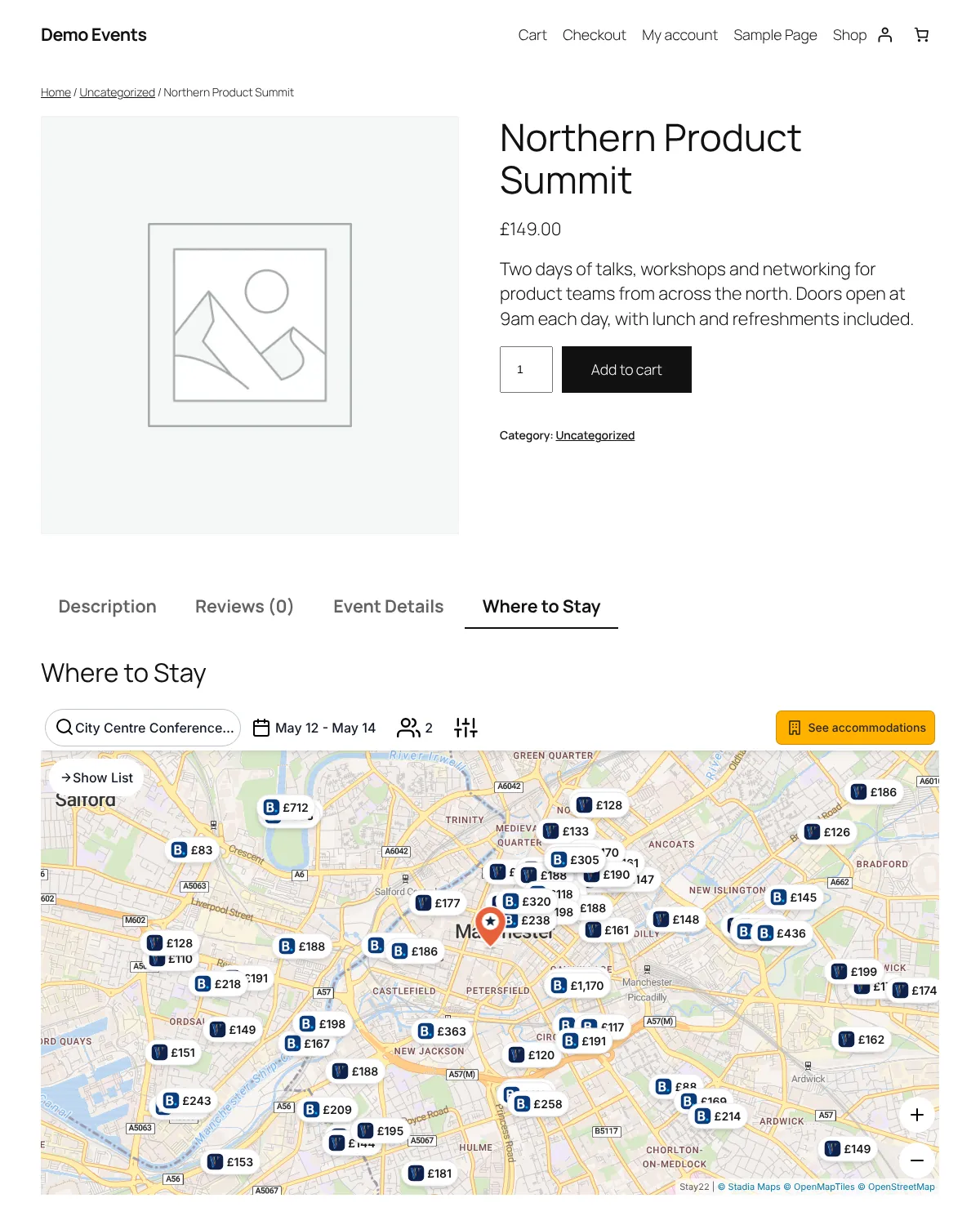
Built for FooEvents
From the ticket page to the order email.
Hotel Maps Pro uses what you’ve already saved in FooEvents: the event’s venue and its dates, or the date each customer booked.
A Where to Stay Tab
Each event’s product page gets a Where to Stay tab beside Event Details. Prefer it under the tabs, or only where you add the shortcode? Choose in Settings.
Hotels After Purchase
The order confirmation page and My Account show hotels for each event in the order, for the number of tickets bought (up to 4 guests).
A Button in the Order Email
The Processing and Completed order emails get a Find Somewhere to Stay button that opens the event’s map on the right dates.
Every Kind of Event
Single-day events, multi-day events over days in a row or chosen days, and bookable events, which use the date each customer booked.
The Right Place on the Map
The map uses the event’s Google coordinates, GPS coordinates or venue. If the venue is only a short name, you’re warned and can give a different address.
Control for Each Event
A Hotel Maps Pro box on each event: always show the map, hide it, or set different check-in and check-out dates. Online and finished events never show one.
How It Works
Three steps, and the second one takes a few seconds.
01
Install Hotel Maps Pro
Download the plugin and upload it under Plugins > Add New Plugin > Upload Plugin, alongside FooEvents.
02
Nothing to Unlock
Every feature works straight away. Registering your site with Hotel Maps Pro is optional.
03
Open Any Event
Upcoming in-person events now have a Where to Stay tab. Fine-tune it in Hotel Maps Pro > Settings.
Questions about FooEvents.
Something else? Contact us or ask for support.
Do I need the paid version of FooEvents?
FooEvents only comes as a paid plugin, so yes, you need FooEvents for WooCommerce itself. Hotel Maps Pro is free, and works with FooEvents on its own or with its Multi-day and Bookings add-ons.
What about bookable events?
With FooEvents Bookings, customers choose their date when they buy, so the event page’s map opens without dates and invites them to add their own. After purchase, the order confirmation page, My Account and the order email use the date they booked.
What about multi-day events?
An event over days in a row uses its first to last day, checking out the morning after. An event on chosen days uses its next run of days in a row.
Can I choose where the map appears?
By default it’s in a Where to Stay tab on the event’s product page. In Hotel Maps Pro > Settings > Event Plugins you can put it under the product tabs instead, or only where you add this shortcode: [hotel_maps_pro event="current"]
What does the order email button link to?
The event’s own page on your site, opened at its Where to Stay map with the dates for that order. It goes in the Processing and Completed order emails, and you can switch it off in Settings.
What about online events?
An event with a Zoom meeting and no venue doesn’t show a map, and nor do events that have finished. An event with a Zoom meeting and a venue shows one, for the people who attend in person.
Is it really free?
Yes. There are no paid plans. We earn a commission from the booking site when an attendee books, and attendees pay the booking site’s usual price.
Which booking sites does it show?
Listings and prices come from booking sites including Booking.com, Expedia, Hotels.com, Agoda and Vrbo. Attendees book directly with the booking site.
Popular with organizers of: Conferences · Trade Shows and Exhibitions · Festivals and Concerts · Sports Events
FooEvents and WooCommerce are trademarks of their owners. Hotel Maps Pro is an independent plugin and isn’t affiliated with or endorsed by FooEvents or WooCommerce.
Guides
Guides for event organizers.
Event Organizers
Hotel Booking for WordPress Event Plugins
Adding hotels to The Events Calendar, Events Manager, WP Event Manager, Modern Events Calendar, EventON and FooEvents.
Read the GuideEvent Organizers
Room Blocks Explained: A Guide for Event Organizers
What a room block is, how attrition works, and how to show yours above a map of everything else.
Read the GuideHow-To
How to Add a Hotel Map to Your Website
WordPress, Wix, Squarespace, Webflow, or a page of its own, step by step.
Read the Guide- The Events CalendarEvery event page gets a Hotel Maps Pro map for its venue and dates.
- Events ManagerEach event’s location becomes a Hotel Maps Pro map, with no setup.
- WP Event ManagerEvent listings show where to stay, right below the details.
- Modern Events CalendarSingle and repeating events show where to stay, in every layout.
- EventONEach event’s location becomes a map of where to stay, repeats included.
Put Hotel Maps Pro on every event you list.
Free, and live in about ten minutes.
Download the Free Plugin